This is an old article on nostuff.org. It is (a) out of date (b) with broken inages and links (c) badly written. I, Chris Keene, disown all of it, even though it was created by me. See the main nostuff.org homepage, or the About page for more info.
A play with the Talis Aspire API
By chriskeene |
I wanted to have a go with the Talis Aspire API and see what potential it had and how easy it was to use. Talis Aspire is a Reading List system with the key purposes being, firstly, a method to inform libraries which books and resources they need to buy, secondly, a unified way to access lists and content, especially as more and more stuff is online.
But the array of systems across a University delivering the online ‘student experience’ is staggering and often confusing, hence the need to to investigate ways of embedding data from one system (such as this) in to other systems. My end goal is to display a list on a webpage outside of the Aspire website.
Step one, let’s find a list:
http://liblists.sussex.ac.uk/lists/1039163E-7AB2-8875-704A-B0952E2C1EAC.html
And we know we can always get RDF and json versions of the list.
http://liblists.sussex.ac.uk/lists/1039163E-7AB2-8875-704A-B0952E2C1EAC.json
http://liblists.sussex.ac.uk/lists/1039163E-7AB2-8875-704A-B0952E2C1EAC.rdf
So far so good. But those URLs aren’t guessable. However the pages for courses are, by using a course code
http://liblists.sussex.ac.uk/courses/809l1.html
The HTML version just shows there is one list for this course. However the json version is actually more detailed:
http://liblists.sussex.ac.uk/courses/809l1.json
(the json and RDF won’t lodfsjhbgyvgfx ytftfdssjn njk ko6 kok pretty in most browsers, Firefox handles it quite well, sometimes you need to View Source).
A more reliable way is to use the following syntax:
http://liblists.sussex.ac.uk/courses/809l1/lists.json
or http://liblists.sussex.ac.uk/courses/809l1/lists.rdf
OK… so if we know a course code we can fetch some json or RDF (well rdf/json or rdf/xml). Good.
But take a look at those outputs.
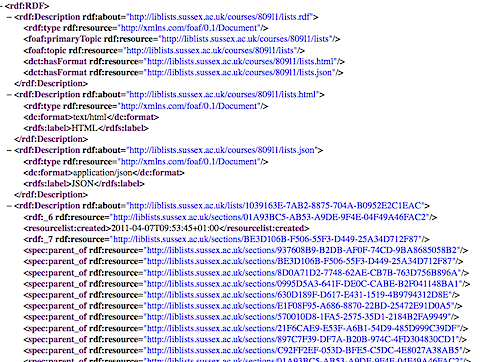
They are mostly URLs (well, URIs), and of course, this being RDF, that’s to be expected. The only string written in English is the name of the course. In fact, getting technical, it’s hard to see what to do with all this stuff.
But that doesn’t help me in my quest to display a full reading list, I’ll need the names of books and other items, and the names of sections of the list.
It looks like I will need to make more calls to the Aspire API fetching information for every item and section, by using the unique URI for each item. That’s a lot of http requests! And if my page requires all that information to render then my user could be in for quite a wait. Worse, if this information is to be embedded in to other systems it could be the cause of other web systems being slow to respond.
We shall see, anyway, time to dust of those json skills (ha!) and start having a go.
Graphite
It’s then I remembered Graphite, a php package written by Christopher Gutteridge at the University of Southampton. I had been lucky enough to attend Dev8D (a developer event on speed for those in Higher Education), where Christopher and a couple of others from Southampton had run a hands on getting started session with the PHP library (favourite moment was at the start of the session, classroom full of eager people with laptops open, “right hands up if you’re running Linux?” … “fine, who’s running OS X?, no probs… Windows… OK you guys here’s a Linux Live CD to use”).
<?php

include_once ("arc/ARC2.php");
include_once("Graphite.php");

$graph = new Graphite();

// load the page for a list associated with a course code.
$graph->load("http://liblists.sussex.ac.uk/courses/809l1/lists.rdf");

print $graph->dump();

?>
If you have access to a web server that can process PHP then do follow along. This is about as pretty as it gets. We simply load the page of RDF, and then use Graphite’s pretty print (dump) function to display it on screen. This is pretty and pretty useful.
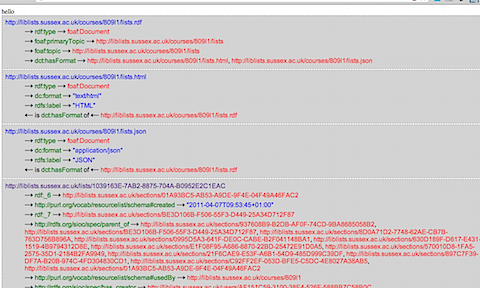
This helps us see what the data represents.
Remember this isn’t the URI for the list itself, which can be found half way down the screenshot.
Let’s test accessing some of the values we can see.
print $graph->resource("http://liblists.sussex.ac.uk/courses/809l1/lists.rdf")->get( "foaf:primaryTopic");

print $graph->resource("http://liblists.sussex.ac.uk/lists/1039163E-7AB2-8875-704A-B0952E2C1EAC")->get("http://purl.org/vocab/resourcelist/schema#created&");
Using these two lines we get the following output:

Not pretty, but we can see a URL and a date string. Lets look at the dump again.


It works. We asked for the primary topic of “http://liblists.sussex.ac.uk/courses/809l1/lists.rdf” and it returns http://liblists.sussex.ac.uk/courses/809l1/lists
Likewise when we asked for the “http://purl.org/vocab/resourcelist/schema#created” (create date) of the thing (list) “http://liblists.sussex.ac.uk/lists/1039163E-7AB2-8875-704A-B0952E2C1EAC” we get “2011-04-07T09:53:45+01:00”. Nice.
Before we move on, let’s just make it a little easier to work with, by stating we want to work with the list, the following prints the create date, just like the example above.
// load the page for a list associated with a course code.

$graph->load("http://liblists.sussex.ac.uk/courses/809l1/lists.rdf");

$list = $graph->resource( "http://liblists.sussex.ac.uk/lists/1039163E-7AB2-8875-704A-B0952E2C1EAC" );

print $list->get( "http://purl.org/vocab/resourcelist/schema#created" );
As a next step, lets get a list of sections for the list.
We can see from the dump that the relationship between the list (the RDF subject) and reading list sections (the objects) is that they have the predicate http://rdfs.org/sioc/spec/parent_of. Graphite has a handy ‘all’ method to help us.
print $list->all("http://rdfs.org/sioc/spec/parent_of")->join( ", " ).".n";
For the Subject in question (our list), find all Objects that have a predicate of http://rdfs.org/sioc/spec/parent_of
This produces a list of URIs for each section, but we will need more than that. We need to go and query each of those section URIs to get some information.
First let’s take a look at one, by using one of the URIs (with ref added to the end)
http://liblists.sussex.ac.uk/sections/937608B9-B2DB-AF0F-74CD-9BA8685058B2.rdf
At the bottom we see: spec:name7. Economic Geography</spec:name>, the information we need. So for each section URI, load the info from the URI and print out the section name (spec:name).
foreach( $list->all("http://rdfs.org/sioc/spec/parent_of") as $section) {

  print "<p>This is a section....<p>";
  $graph->load($section);
  print $graph->resource($section)->get("http://rdfs.org/sioc/spec/name");
  //print $graph->dump();
}
So for each section, go and load the rdf of the section and then display the name (the $section var contains the URI for the section).
It works (if slowly):

We can get the names for each section.
And if we can do that, we can do the same for the actual items on the list: query the item URI on the list as well.
It looks like we just need to change the predicate, this time we want everything on the original page of rdf where the relation with the list itself is “http://purl.org/vocab/resourcelist/schema#contains” – if you look at the original data provided by the lists, the URIs for items are listed under this predicate.
First let’s let have a look at what the item rdf provides, to see what we can pull out. You can see a text version of some same item rdf here, and the raw rdf here.
If you look carefully at that you see a problem. The RDF URI for an item does not return any metdata about the bibliographic details of the item. Not even, it seems, an ISBN to get started with to look it up more information elsewhere.
In fact afte a while of looking I couldn’t find any way to return the information I was after, and talking to others seems to have confirmed this. So was my challenge impossible: to display a list using the Linked Data api, as a proof of concept so it could be used in a different application? Where actually there is a way, in fact even two, and one of which is hinted at in the rdf above. It’s just not using Linked Data as such.
There are RIS and CSV versions of a list, these provide full bibliographic details for a list, though don’t break this down by sections.
I haven’t created any code to use these, but these are standard (and simple) formats to make use of.
In one sense these provide quick access to the information, without the need to make multiple requests to the Aspire API for each item, on the other hand Aspire is trumpeted as a Linked Data based product and therefore it feels a little odd to need to use alternative formats to access what to me seems like key information.
Related
You have been reading a really old article on nostuff.org which probably is (a) out of date (b) with broken inages and links (c) badly written. I, Chris Keene, disown all of it, even though it was created by me. See the main nostuff.org homepage, or the About page for more info.